
Week Four covers 26 October–1 November 2026; compiled on 1 November. All illustrations in this article were newly drawn as diagrams or fictional examples. They are not pages, assets or data from the original project.
I received feedback that a menu did not fit on a phone screen.
The screenshot showed only that one place. I extended the follow-up check across the phone layout instead of stopping at what was visible in the screenshot. That turned up a few more problems: the page header covered a contents heading; a long, unbroken string in the search field could stretch the entire page wider than the screen; and some cards and body text wrapped badly. Tables could retain their own horizontal scrolling, but the rest of the content needed to fit within the screen.
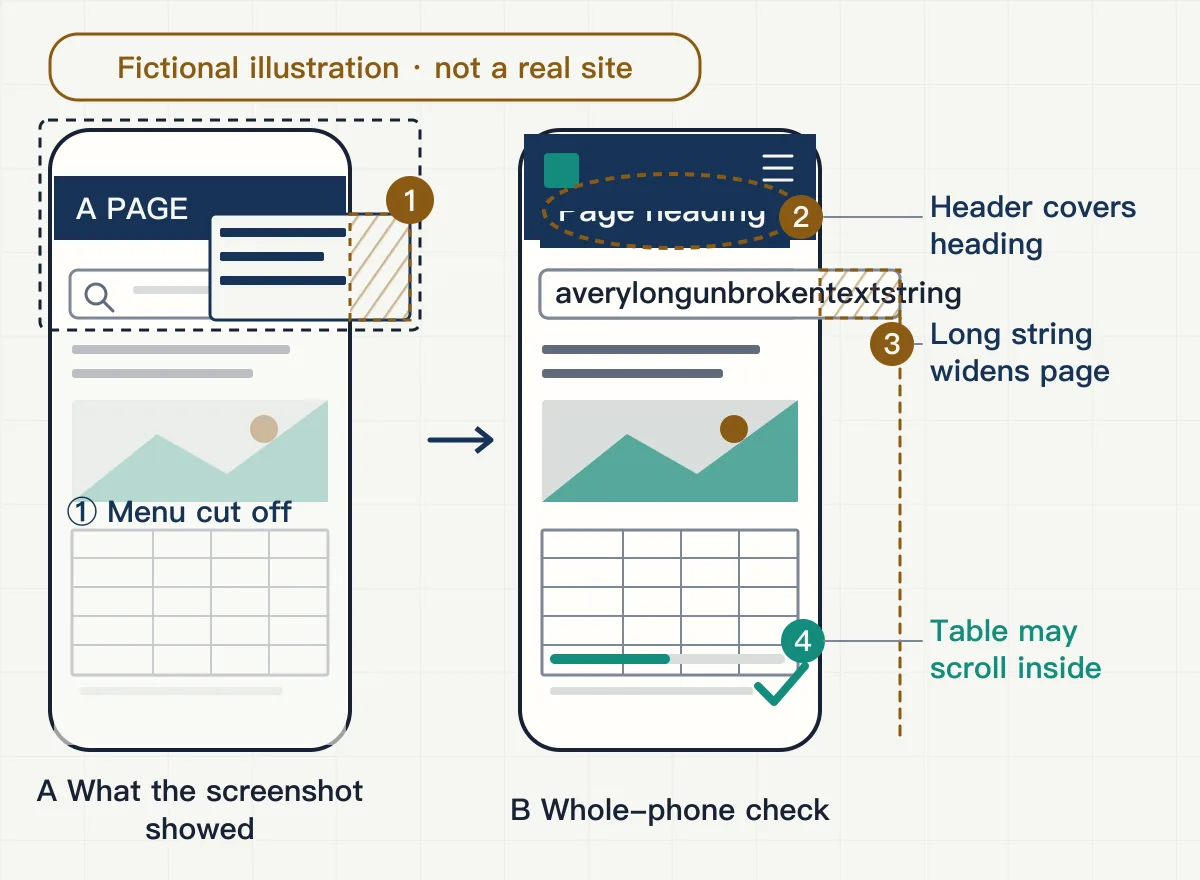
The follow-up also covered a “More” menu on another demo page: whether Esc closed it, whether Tab cycled within it, whether focus returned to the original button afterwards, whether the page behind it scrolled while it was open, and whether the menu itself could scroll in landscape orientation. Space for inputs and filters was checked again at narrow widths too. These were checks at different screen widths. Simulated widths can reveal layout problems, but they cannot replace a complete check on a real phone.
This week I was moving the website towards delivery: reviewing previews and trying entry points myself, while coordinating changes, checks and releases that involved collaboration. The demo dashboard and copy review were two other strands running alongside it.
Before handing it over
The new version first went into a separate preview environment for integration checks. The old version stayed as it was for rollback.
The homepage worked in preview, but the article list reported a loading failure. The API returned a success status, yet its response was missing the header that allowed the preview domain to read it. The browser received a response but would not let the page read it; the preflight request before form submission failed too. After the adjustment, both the preview and production domains could read the response, and the article cards returned.
Seeing a page in the browser was still not enough. When someone opened an article URL directly, the server needed to return the article body, the right canonical URL and the right status code. Old links needed to lead to their new locations. A nonexistent article needed to return a real 404, rather than an empty page that appeared normal. The preview site carried a “do not index” marker; the production environment needed a separate check to make sure that marker had not come with it. The form's error path was checked separately; that did not establish that a real submission had succeeded.
The old site's files and data were first backed up somewhere private, then restored in an isolated copy. The homepage, several inner pages and an uploaded image were opened for comparison. That verified that restoration was possible; it was not a restoration performed in production.
I decided which checks had to pass, which issues would not block this step, and how long to keep the old version for rollback. Before the switch, each public file in the candidate site had its hash checked. Routes, status codes and search-related settings were checked too.
The interactive piece from the previous week, which visitors could rotate themselves, had also run into trouble. On my phone it first stayed on the loading screen; later it appeared, but slowly. A different test browser reported that it could not establish a graphics environment. Those were two separate observations, not one established cause. The sizes of the models and textures in the asset folder also did not tell us how much a phone actually downloaded or how long it took. Without staged measurements on the phone, I would not attribute the problem to the server, the backend or the menu we had just fixed. I decided to record loading speed as a separate issue and keep the existing display for this round.
The admin entry point: what still needed checking after the address
At first, the admin entry point on the website led to an address that would not open, while the admin at another address worked. I logged in there myself: I could read the articles, editing page and version list, and I remained logged in after refreshing. After assessing the impact, we changed the entry point to lead to that working address for the time being.
But the admin was meant to live at the website's own address. Sending people elsewhere did not meet that requirement. I pointed out that the entry point was still in the wrong place. Work on it continued, while the finished main site and interactive piece also needed to be preserved.
The expected address later had a login page. At that point I separated the checks into three questions: could the page open; did its requests reach the right place and return the expected response; and could someone actually read and write after logging in? The login page answered only the first. A “login required” response while logged out showed that the request reached the right place, but said nothing about reading and writing after login.
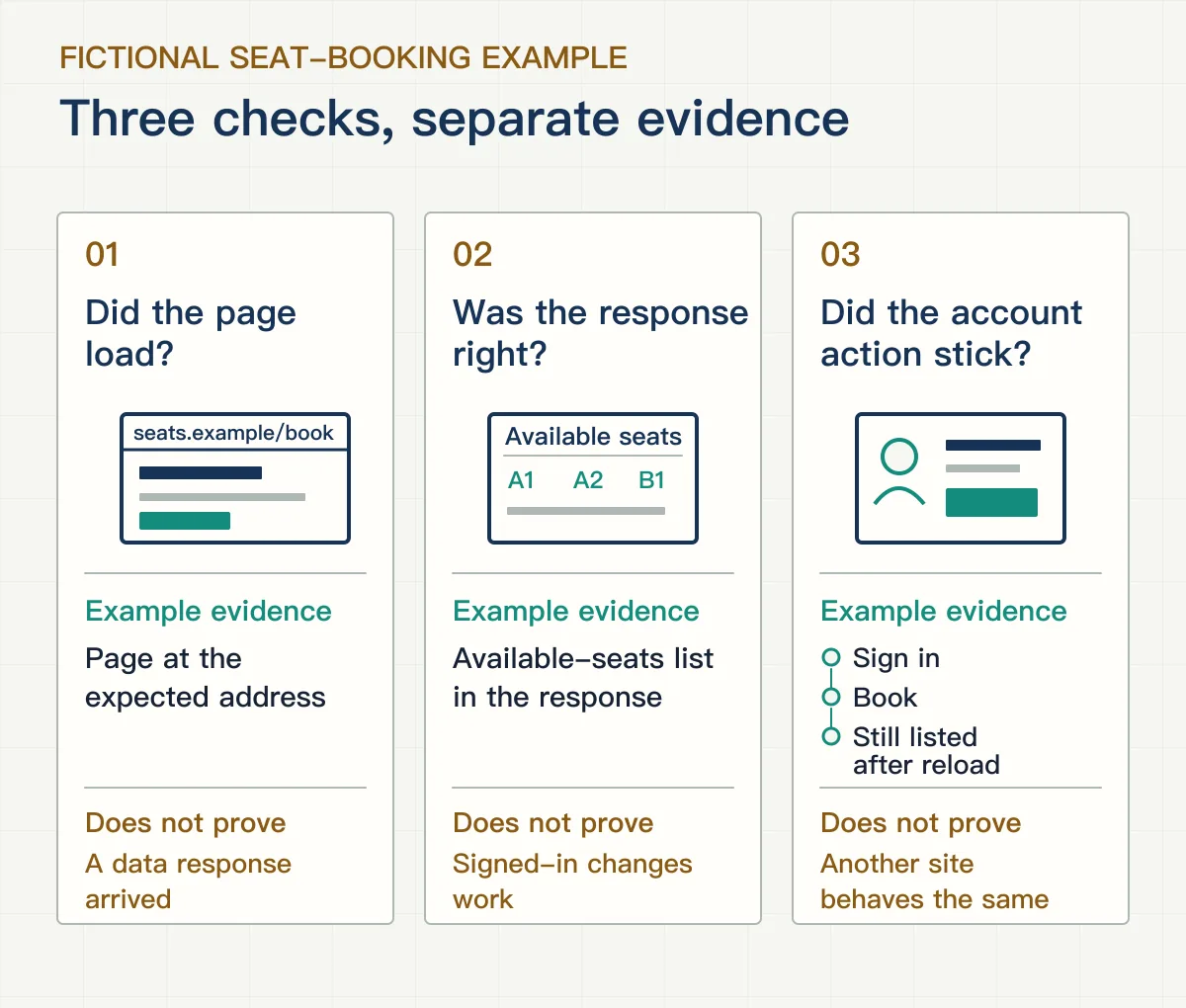
Reading articles at another address could not prove that this admin could write to them.
Even if the public content at both addresses looked the same, that would not show that changes were written to the same underlying data. Actual operations after login still needed to be checked separately at this entry point.
The rollback arrangement was settled then too: keep the earliest old site and its data, without making a separate rollback package for every later iteration. The old site could be restored to that initial version. An update package that replaced only some files was not a whole-site backup, and could not be described as a one-click reversal of every update.
Colours and the partner page: previews first
For this round of colours, I again looked at a preview before deciding what to keep.
The aim was more depth and presence. The first version still did not feel strong enough to me. The next had richer colours, but the first screen's wording, the composition of the product display and the mark had changed with them. It had also gained a display stand that had not existed before. I pointed out that a colour change did not include replacing the content. The wording, homepage video, composition and original mark were restored, and the added stand was removed. What stayed were the colours, theme switch and necessary colour adjustments in the interactive piece. Its original model, actions and narrative remained.
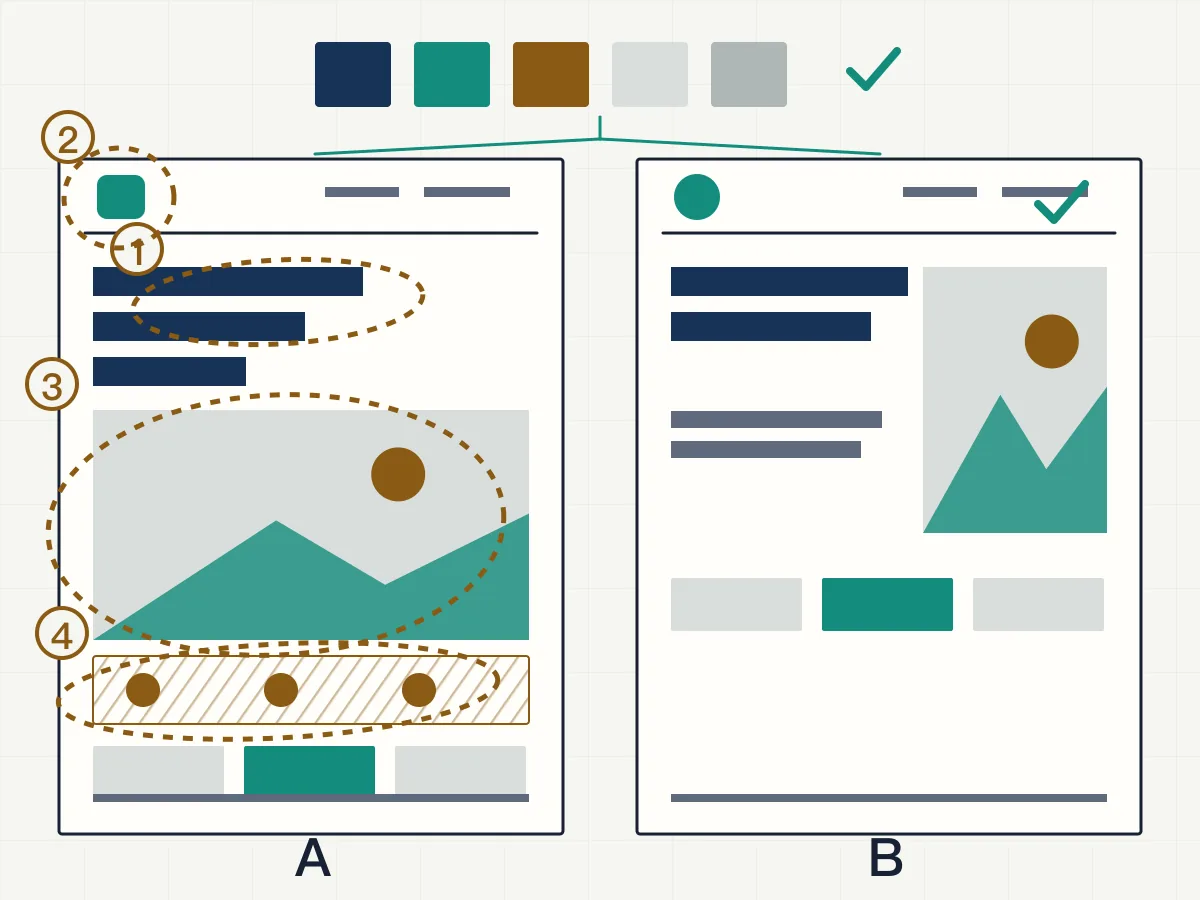
Afterwards, we compared two visual treatments using a complete long image of each. The content and scrolling order were the same, and even the sequence of the interactive display was assembled into the images. I looked through them together from beginning to end and approved the choice, which then went through checks and publication. The light theme became the default; the dark theme could be selected, and the choice was remembered. Before release, the original wording, media references, mark files and links were compared item by item with the old version. We did not decide that “the content was unchanged” from screenshots alone.
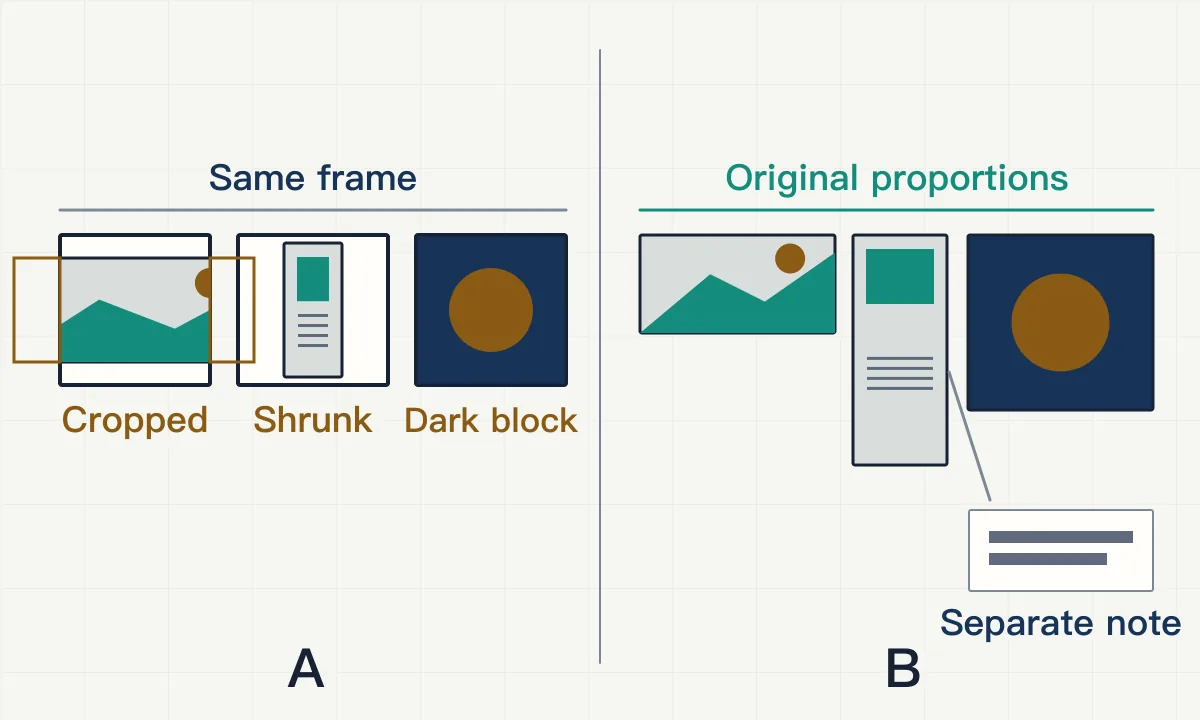
The partner page had its own comparison afterwards. The direction was a more refined look while keeping the existing copy and marks. We discussed an explanation on the left, several columns of marks on the right, lighter dividers and a single column on phones. The marks could not have their white margins cropped away, be colour-filtered or have their proportions changed. Nor could marks containing small text be squeezed into tiny horizontal strips just to shorten the page. I agreed to see a version, with the option of dropping it. After looking at the preview, I thought it looked worse than the original. The split-column trial was withdrawn and the centred layout restored.
New entries still needed to be added to the page. There were several versions of the assets. When comparing them, I asked why a version with a white background and no small subtitle had been chosen for one organisation. At the width it would actually appear on the page, the main mark needed to be clear; squeezing that small line of text into the image would only make it illegible. The organisation's description went underneath in normal-sized text. For another, we chose the high-resolution original with a white background, avoiding the compression and dark block of colour that came with a smaller dark-background image.
The introductory copy was added after checking each organisation's public information. Once it was in place, I felt the new entries were too long beside the existing ones, so we shortened them further and aligned their line counts and label positions. The introductions described only the organisations' publicly stated work; they did not imply that a partnership had already been delivered. The existing entries and order stayed in place. Only new entries and unaltered mark images were added.
What was merged, and which version was live?
After the pages were approved, the colours and partner page went into a PR. I later found they had been put into the same PR. I asked why they had not been delivered in separate batches, then decided to withdraw it and split the work by delivery scope: the theme and switch in one batch, the partner content and assets in another. Each was checked and merged separately, and the final content matched the approved versions.
Once the code was sorted out, we still needed a separate record of which version was running online, so that it could be traced later.
The release used an independent snapshot that retained earlier fixes and some additional files. Later commit history in the repository would not necessarily describe everything used for that build. Recording only one commit could omit those files. When filling in the record, the tracked files in the release workspace were compared one by one with the corresponding commit and confirmed to match. That established a match in source files; functional checks recorded whether the page behaved correctly.
The theme release had another problem. An address with a temporary parameter showed the new version, while the ordinary URL still returned the old page. The page content in the two packages was byte-for-byte identical; their archive information differed. Once that information was corrected, the ordinary URL showed the new version too. Looking only at the parameterised address would have missed the fact that ordinary visits had not updated.
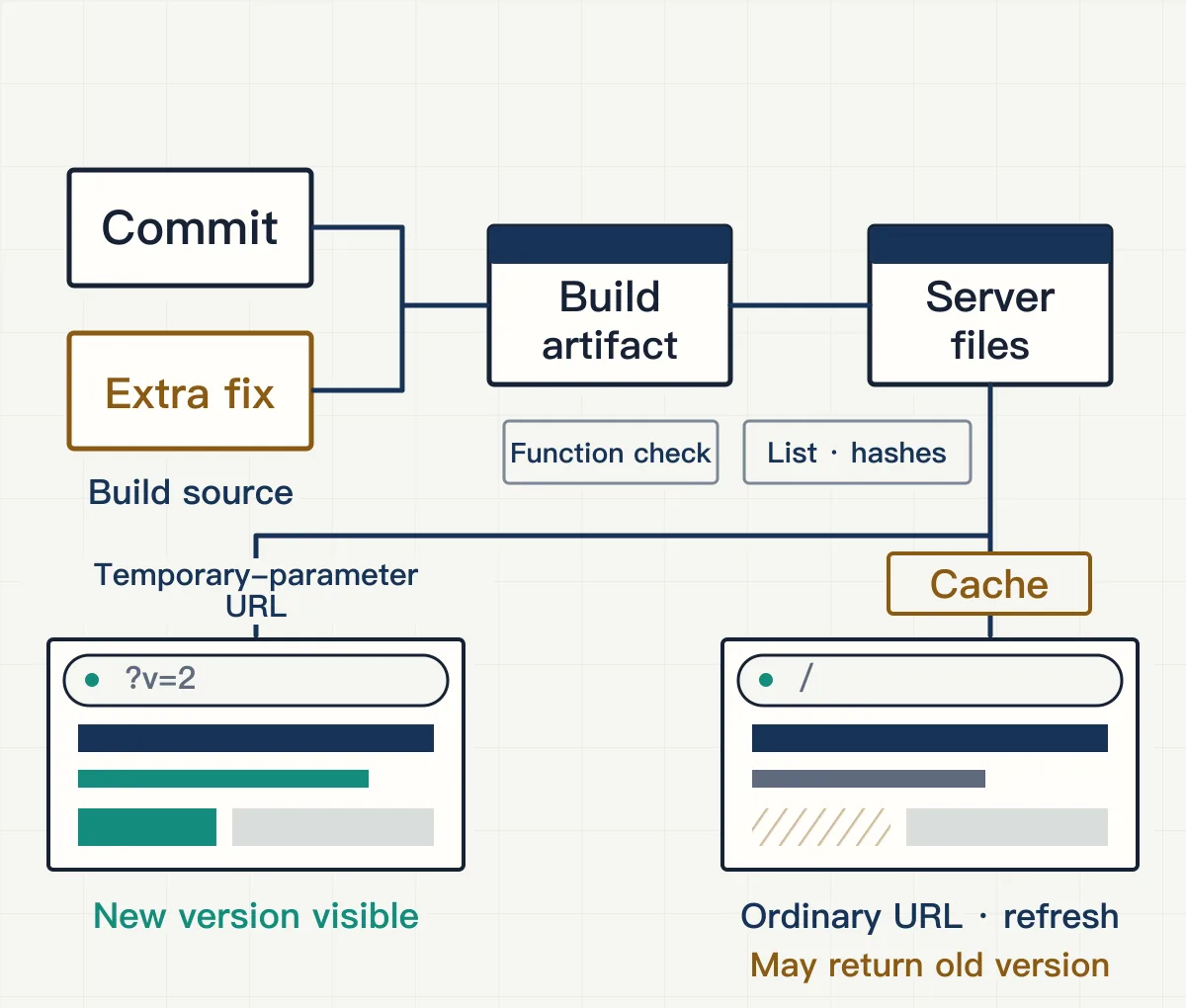
The final record began with the source files and additional files actually used, then connected them to the build output, files on the server and page returned by the ordinary URL. File lists and hashes preserved content comparisons; functional checks recorded page behaviour separately. Different parts had their own release scope, so no single identifier stood for everything.
The deployment instructions left behind explained where to enter, which button to press, what to fill in, why each step was needed, how to confirm success and where to look first if something went wrong. Initial deployment and routine updates had separate instructions. Alongside the release record, they gave me, or someone else taking over, something to consult.
The demo dashboard figures had to add up
I was also adjusting a data dashboard for a demo this week. Its figures were demo data, not actual results. Still, the overview, analysis and report could not each use different numbers. The sequence from a record being detected, to acknowledgement, resolution and closure also had to make sense.
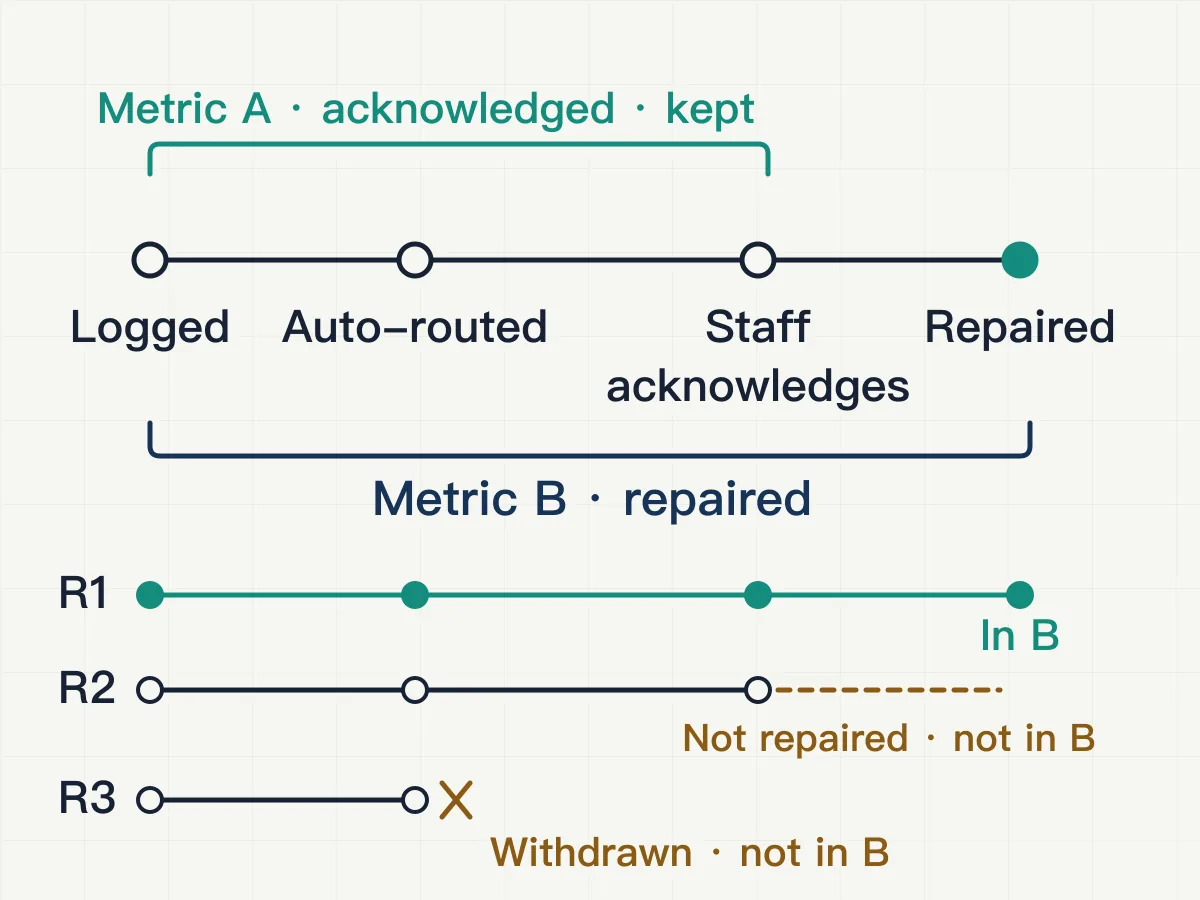
The time metric went through several rounds. I then clarified the process it was meant to show: from the system detecting an issue, through a user dealing with it, to the system determining that it had been resolved. By that definition, the endpoint was “resolved”, not the moment someone pressed an acknowledgement button.
The original interval from detection to acknowledgement was still useful and was kept separately. Another duration was calculated up to resolution. The name changed during the discussion; my final choice was to keep “response time” as the label, state its endpoint beside it, and put the full definition in the tooltip and report. Records not yet resolved, missing an end record or ending in another way needed explicit handling rules, rather than being mixed into this metric. The figures, timestamps and inclusion rules had to change together. Otherwise, only the label and unit would change while the calculation still measured the original interval.
Proportions had a similar problem. One record could carry two categories, counting once in each category but only once overall. Adding the category counts would not give the overall count. Directly averaging the percentages of several categories or time periods could ignore their different denominators. The counts needed to be pooled first, then the proportion calculated. When a new record was added, the list, category figures and overall figure all needed to change under the same rules. The fictional book-return records below let you switch between calculations and see the difference.
How should the two-week rate be calculated?
Both numerator and denominator count records: 4 of 20 carry a label.
One record can carry multiple labels. Choose a rule and see what its numerator actually counts.
Week 1 · 4 records
Week 2 · 16 records
- Numerator · labeled records
- 4
- Denominator · total records
- 20
- Result
- 20.0%
4 / 20 ≈ 20.0%
Percentages are displayed to one decimal place; calculations use unrounded values.
Label counts: Late 3, Damaged 2, Missing page 1; 6 occurrences across 4 distinct records.
Numerator 4, denominator 20, result 20.0%.
The follow-up recommendations at the end of the report changed too. I pointed out that different issues called for different actions: one might need a single action, another a different response, and only a few would need several actions together. Every optional action could not simply be attached to every record. The recommendations were later selected for each record's circumstances and moved to the end of the report, corresponding to the records above. On finishing it, a reader needed to know what to do, rather than just find another heading labelled “Recommendations”.
I reviewed page issues through complete screenshots. First, I pointed out that the right-hand layout felt uneven: time and name were crowded together, and line heights did not align. Then I pointed out that the sidebar background stopped halfway down the page. While the forms of address were being tidied, removing a generic one had also removed a role detail that needed to stay. I clarified that identity detail again, then checked the name, identity and description separately. When the screenshot was too blurry, a clearer version was exported and kept for comparison.
This round also prompted a separate piece of research: where a demo dataset comes from, where it runs, how it is updated, what remains after a refresh, and which guarantees change when real data replaces it. I set out the general points in a separate design note on mock systems, using a fictional meeting-room booking example.
Copy review: first, find the original location
For the copy review, public-facing text was gathered with its Chinese and English versions and a screenshot of where it appeared on the website. The result was a page where entries could be reviewed one at a time. Each carried its page, section and source, so I could move from a sentence back to how it appeared on screen. Display states the browser had not captured were supplemented from source files and marked separately, rather than treated as screens we had individually viewed.
The tool was adjusted to how I actually reviewed. The original status dropdown was too slow to use, so it was replaced with one-click buttons. Beside priority issues were a suggested status, next step and questions still to confirm. Statuses and notes were stored locally, survived a refresh, and could be exported and imported. Old records also needed to keep working as the tool changed; comments already entered should not simply disappear. AI's first-pass suggestions sat in a separate column. Having a proposed edit did not automatically mark an entry “reviewed”.
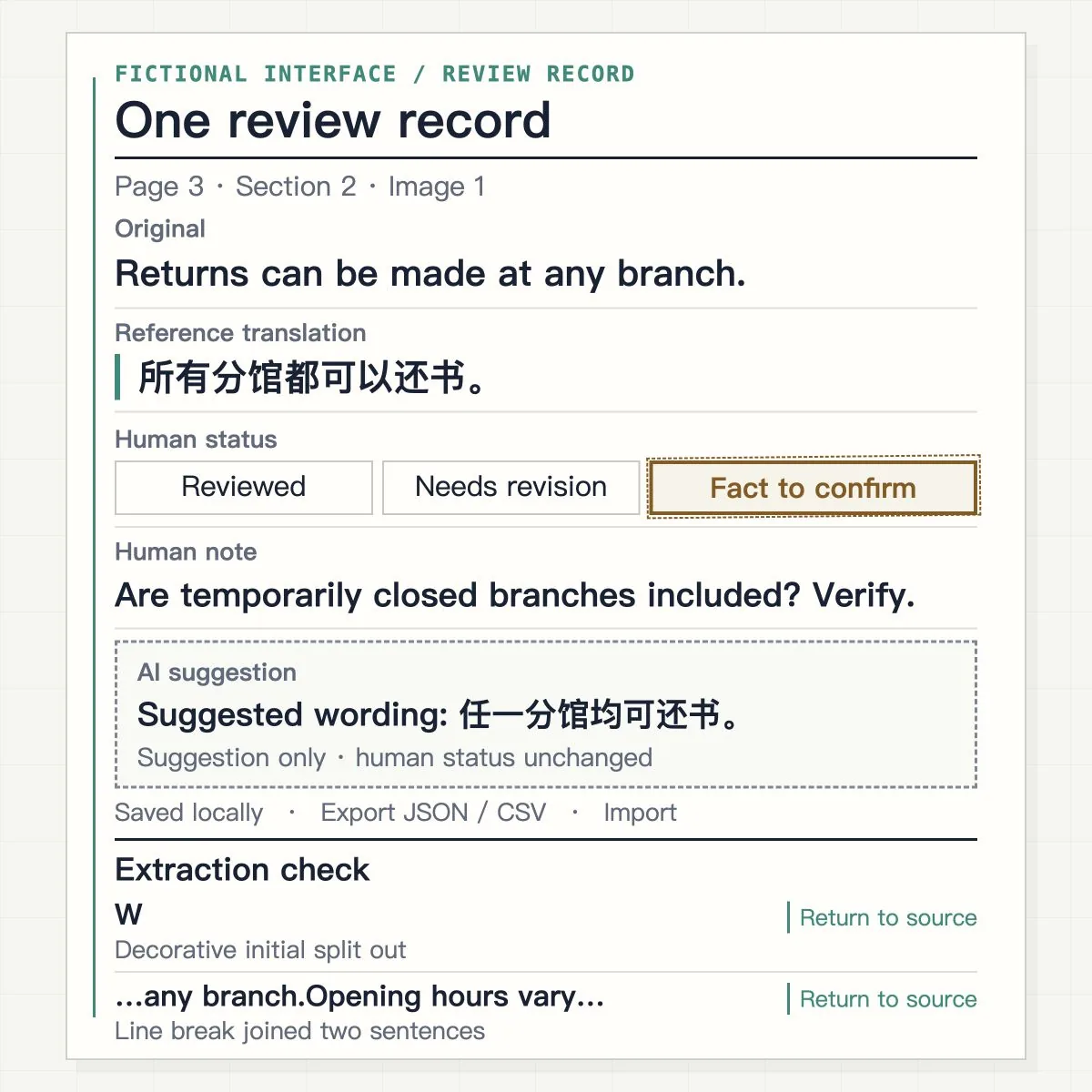
The issues needed different treatment. Figures without a clear basis, conditions of use and factual status needed checking against the facts; they could not first be polished into definite claims. Wording problems could receive a direct edit suggestion. Others came from extraction itself: a line break on the webpage became a joined sentence, a decorative initial was split into its own entry, or symbols from the source code entered the list. Those required looking back at the original page first. Changing the page to match the list could damage something that displayed correctly.
What these materials left behind was a coverage list, one initial pass and a tool that could keep recording feedback. The manual review of every entry was not yet finished. A button recorded a review decision; website changes, factual confirmation and final review still needed to follow.
That menu screenshot ended up leading to a full round of phone checks. The other strands left their own records too: full-page comparisons, review notes, release sources and operating instructions. The next change can start from that specific place.