
The nine-event experience linked here is a public adaptation, rebuilt afterwards from the prototype: the site, people, IDs and data are fictional, and the events are only simulated in the page.
Open the nine-event experience (public adaptation, fictional site)
Why one continuous picture
Ever since I started working on this website, I kept wondering how to present the How It Works section. Text can spell out every step, and a flowchart can connect the arrows, but do readers really understand? I also looked at the websites of similar products, and frankly, I did not understand very well how their products work. I was thinking about how to explain a product to other people, yet that was how it went when I read other people's explanations. When it came to my own page, the question was hard to get around.
I had already run into a similar question during the first week's research. While going through demo materials, the research notes left this question: how do the objects and states in the footage become something that needs handling? How important is it, who receives the information, and what happens next? The suggestion back then was to pick one concrete scenario and connect, in order, the original footage, the risk event, the person who receives the reminder and the handling record. When I later worked on How It Works, this was the same chain I needed to tell.
Then I happened to come across Halter's website. In the middle of its Dairy page there is a How it works section that uses a clear animation to connect, one after another, a cow wearing a collar, a communication tower and a phone app. Whichever part the explanation reaches, that part appears in the picture, and the relationships between the pieces unfold along with it. I wanted to borrow this way of telling to try out my own approach. If the site, the devices, the people and the final record were placed in one continuous picture, could it leave less for the viewer to piece together on their own?
Nine events in one site
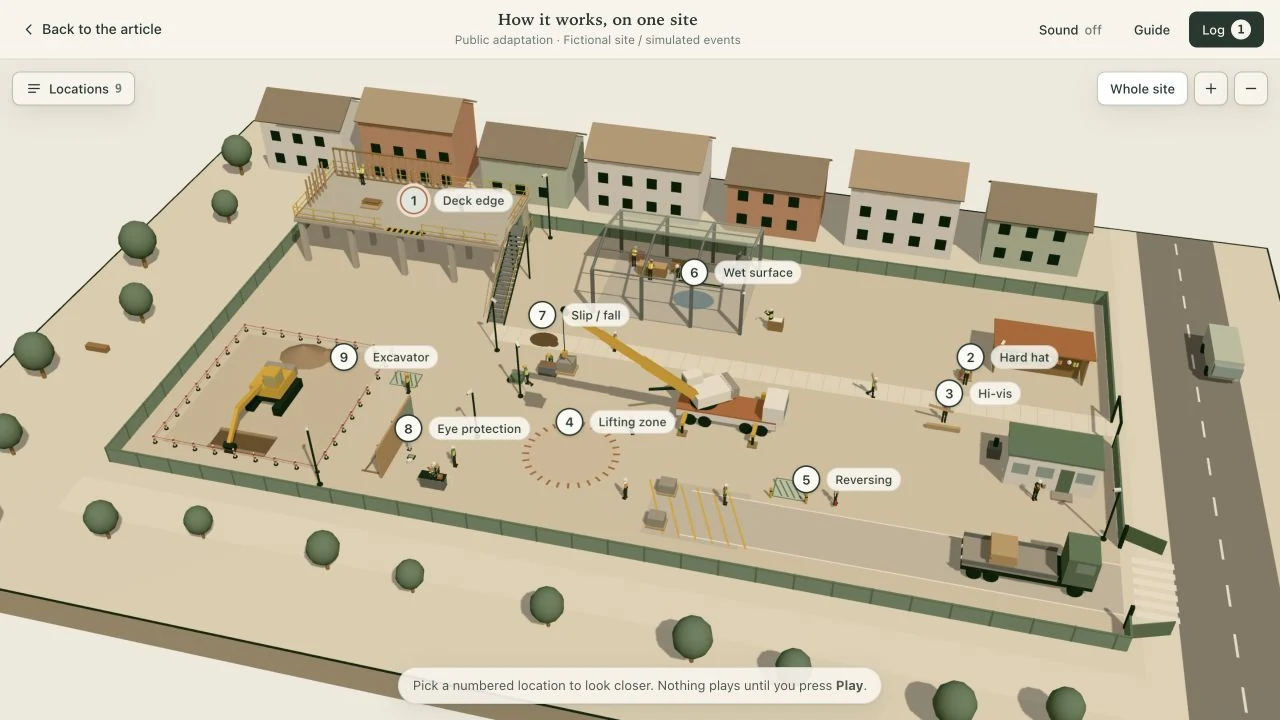
The 3D prototype this time is an illustrative construction site. What happens on a construction site depends a great deal on position: where people walk from, which direction a vehicle comes from, what other work is going on nearby — all of these affect how an event unfolds. I started trying 3D precisely to put these relationships into one space. The prototype uses Three.js to put the site in the browser, where you can rotate it, zoom in and look at the same spot from different directions. It is a concept prototype; the detection, reminders, notifications and report in it are all simulated. I proposed the scenarios, looked at the previews, and decided what to change and what to keep.
Several events were first built separately, and along the way there was also a demo page for switching between them. Later I proposed putting every event we had built into the same scene and filling in the scenarios we had discussed before. The final nine integrated events cover correcting protective equipment, leaving danger zones, people and vehicles crossing paths, fixing environmental hazards, and responding after something has happened. I wanted the areas nobody had selected to keep working, so that people could rotate the view themselves, find a position, and then open up one of the events.
When playback pushes the viewer
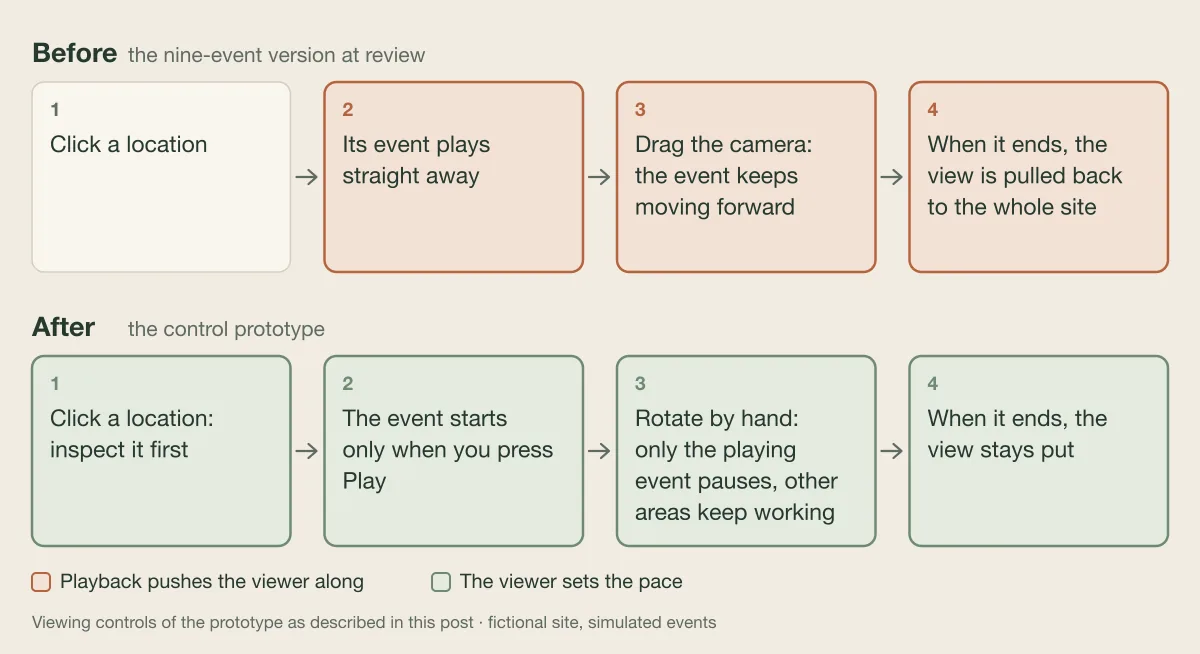
However, once the nine were combined, I felt it was not easy to use, so I asked why, and what it would still be missing if it were treated as a 3D scene in a game. The review turned up very specific problems. Clicking an area made its event play automatically straight away; dragging the camera to change the angle, the event kept moving forward; when it finished, the view was pulled back to the whole site, and the angle you had just found was gone. The scene already let people look for themselves, but the pace of playback was still pushing them along.
Looking back, I had tried both approaches when I first worked on 3D. First there were preset stories and camera moves that took people through in order; later I removed them and replaced them with a complete site that could be freely rotated and zoomed, then added construction activities, people and vehicles. A story can arrange what to see first and what next; free observation lets people find their own position. By the end, I wanted to keep both.
Reminders inside people's actions
A reversing truck
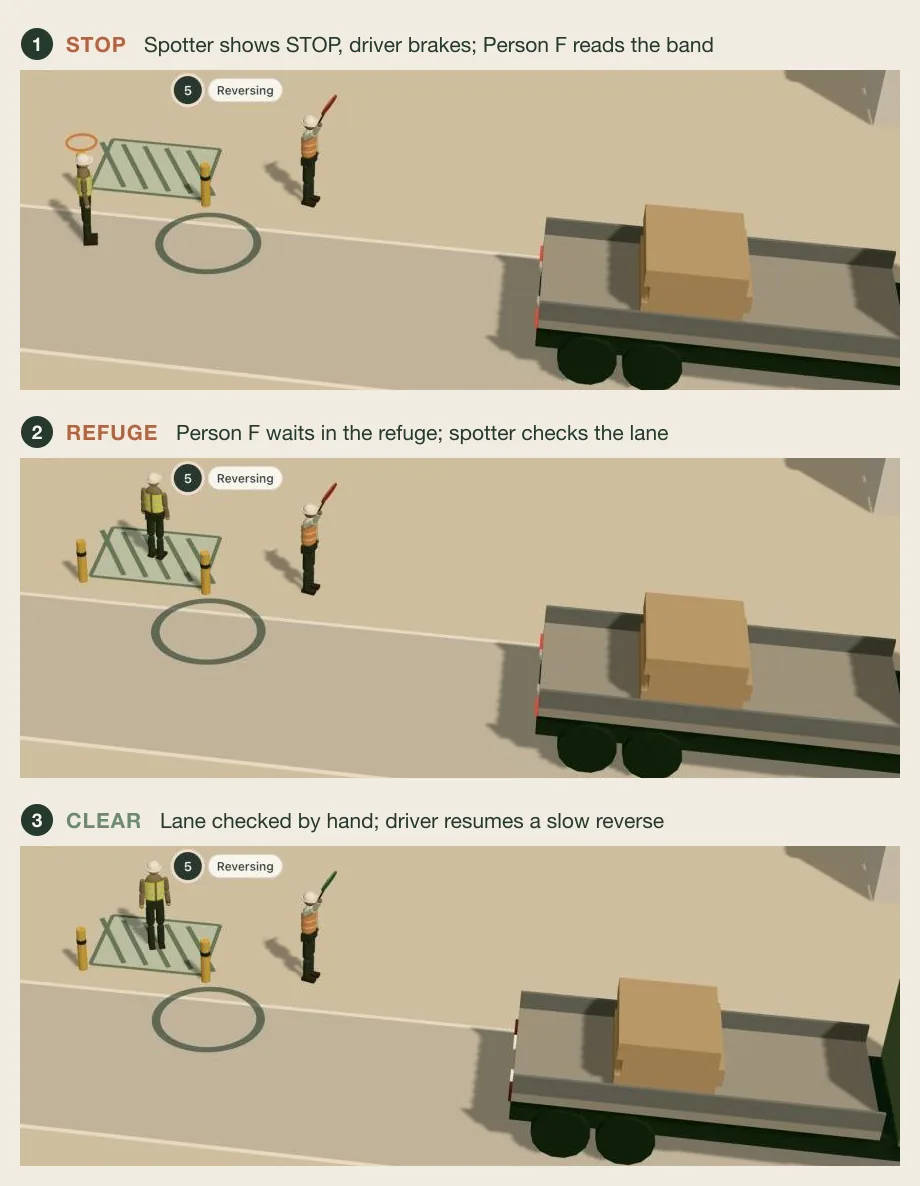
Some processes really do need someone to walk the viewer through them. In one version of the people-and-vehicle crossing, I proposed moving where it happens to an actual work area and telling it through avoiding a reversing truck. Once the location changed, where the worker walks, where the truck backs into and who signals it to stop all had to be rearranged. In the demo, after the worker on site and the person in charge receive the reminder at the same time, the signaller signals stop, the driver brakes, the worker steps back into the refuge area, and only after the signaller confirms the lane is safe does the driver continue reversing. A reminder has to sit inside these actions before it can explain why people stop and when they can carry on.
Machinery
Stories involving machinery also need several people's actions linked together. In some, a supervisor has to stop the person who walked into the area, the signaller signals the operator to pause, and the lift is released only after the area is confirmed clear; in others, the operator first stops the swing, the worker retreats outside the barrier line, and work resumes only after the operator confirms. The machines in the demo are stopped and restarted by their operators; an alarm icon must not stand in for these people's decisions.
Protective equipment and the eye story
Correcting protective equipment looks simple, but the process cannot stop at the reminder either. In the demo it has to carry on to picking up the equipment, putting it on and confirming by hand, and what is left behind is a record of the correction and the confirmation. In the scenario of approaching a dangerous edge, the person has to stop, see the reminder and go back to a safe position.
For the eye section, I asked for a normal grinding comparison first: safety glasses on, sparks flying, work carrying on, no reminder, and it does not count as an event. Only then does it move to another task that needed protection but did not have it in place, followed by pausing, putting protection on and carrying on. Normal work and a situation that needs handling sit in the same story; the sparks themselves should not be presented as the reason for an alarm.
What this story acts out is not wearing protection when it was needed. The eye-injury analysis in the later revision of the first week's report was more complicated than “worn or not.” In one public accident the report cites, the employee was wearing safety glasses, yet a flying fragment still went through them, and the company afterwards changed its tools and work method. The report discussed two kinds of problem separately: methods or protection that do not cover the actual hazard, and protection not being used when it is needed. The putting-on in the demo can tell the correction process for the second kind; whether the protection is adequate is something detection and reminders alone cannot answer.
Two different slips
Slips were also split into two stories. For one of them, there was at the time a version in which the worker steadied themselves after a warning; I chose to keep the possibility of still losing balance after a warning, and then show the response after the fall. The person still ends up sitting on the ground, the notification has to update accordingly, a colleague comes over to check, and what follows remains for review.
The other is an environmental-risk response I proposed: a camera spots a hazardous environment, it is reported to the person in charge, and then there is a meeting and the handling. The later revision of the first week's report traced slips, trips and falls back to walkways, cleaning and the handover of responsibility. In a trip case the report cites, the area was cleaned up after the accident, but the original report pointed out that the root problem had not been dealt with. Mapped onto the demo, simply marking a wet floor still does not say who takes it on or how the walkway becomes walkable again. I chose a short on-site meeting, and the demo has to carry on to assigning tasks, temporary isolation, a detour, clearing the standing water, and reopening only after the person in charge has checked it. Nobody falls here. The two stories answer different questions, and even in the same site they have to be kept apart.
A record that keeps each ending
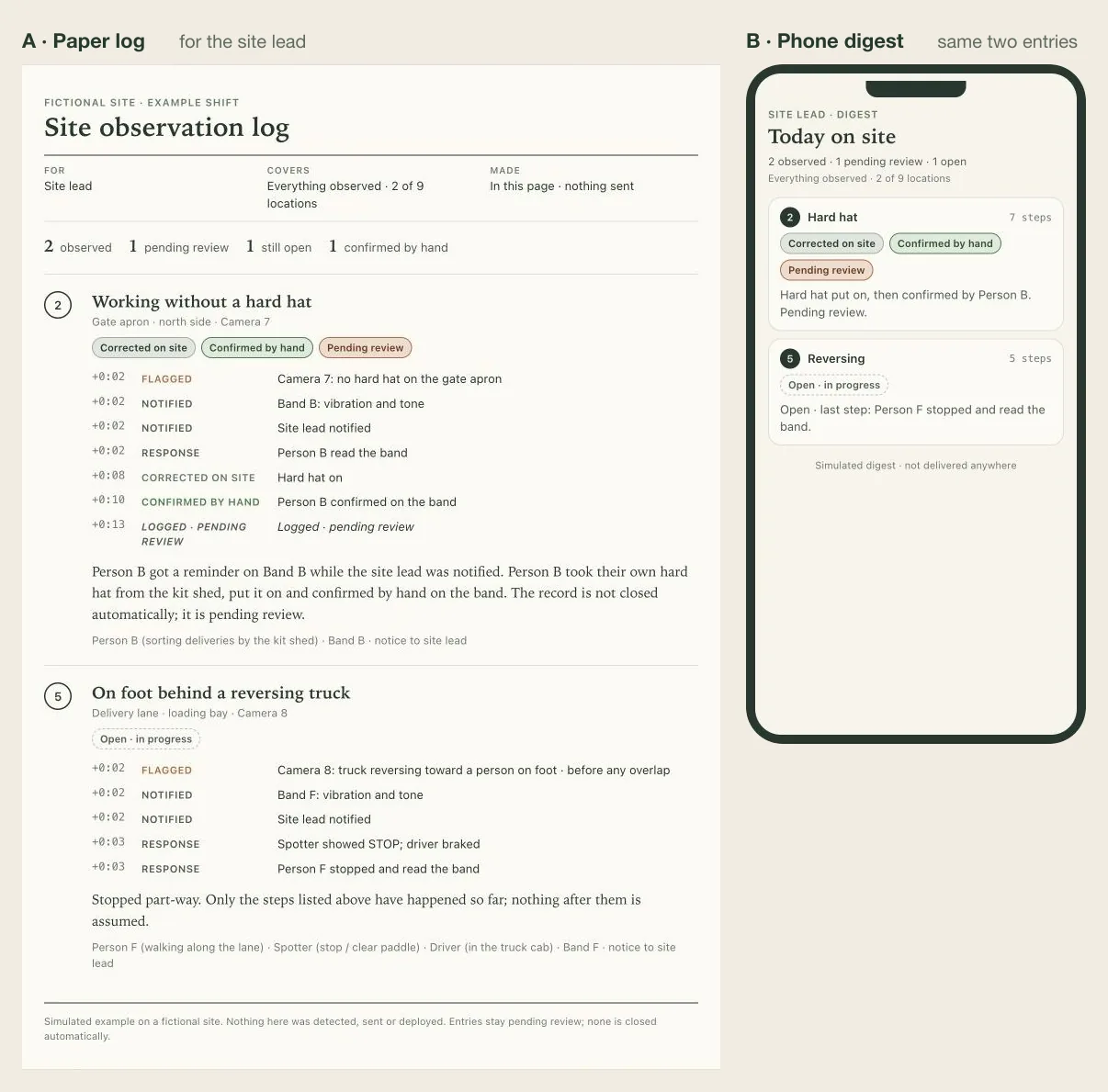
The report was a part of this round's demo that I proposed very early: first produce a report, then transform it into a summary on a phone. Once the nine events were together, the report still had to keep each one's course and ending. Even earlier, when we were organising the event scripts, we had separated reminder sent, on-site risk removed and event pending review. A worker putting equipment back on, a person leaving a danger zone, standing water being cleared — these cannot all be replaced by one pop-up notification; what actions were taken on site, and whether there was a human confirmation, have to stay with the event.
The integration also involved things that are hard to notice from the overview. Each earlier version had its own staff and device numbers, and once they were merged the mapping had to be reorganised so that one person's reminder was not recorded under another event. Each story also has its own playback progress, and the report has to point to the step that event actually reached. Normal work should not count as an event either. When the paper report turns into a phone summary, the layout can change, but inside it has to be the same set of records.
Giving the camera back
To keep free observation as well, event progress and camera control had to be coordinated deliberately. When someone rotates the camera, should the event that is playing wait? Should construction elsewhere stop too? Where should the view stay after an event ends? All of this had to be made clear. With nine events in the same site, these interactions decide whether the viewer can keep up with each one.
After the review, I had this nine-event version archived first, and then had a control prototype made. The existing events and report were kept; this round focused on adjusting the viewing controls. Clicking an area first inspects it, and the event starts only when you press play yourself; when you rotate the camera by hand, only the event that is currently playing pauses, and the other areas keep working as usual; after it ends, the view stays put, and you go back to the whole site yourself when you need to. Events that have not been triggered do not enter the report; those that were triggered but have not finished keep the part they actually reached.
Still to confirm
When this round of discussion ended, the new prototype was still waiting for me to try it and confirm. Now that the work has reached this point in my own hands, I still want to know whether someone who was not involved in making it can, after seeing it, say clearly what the product does on site.